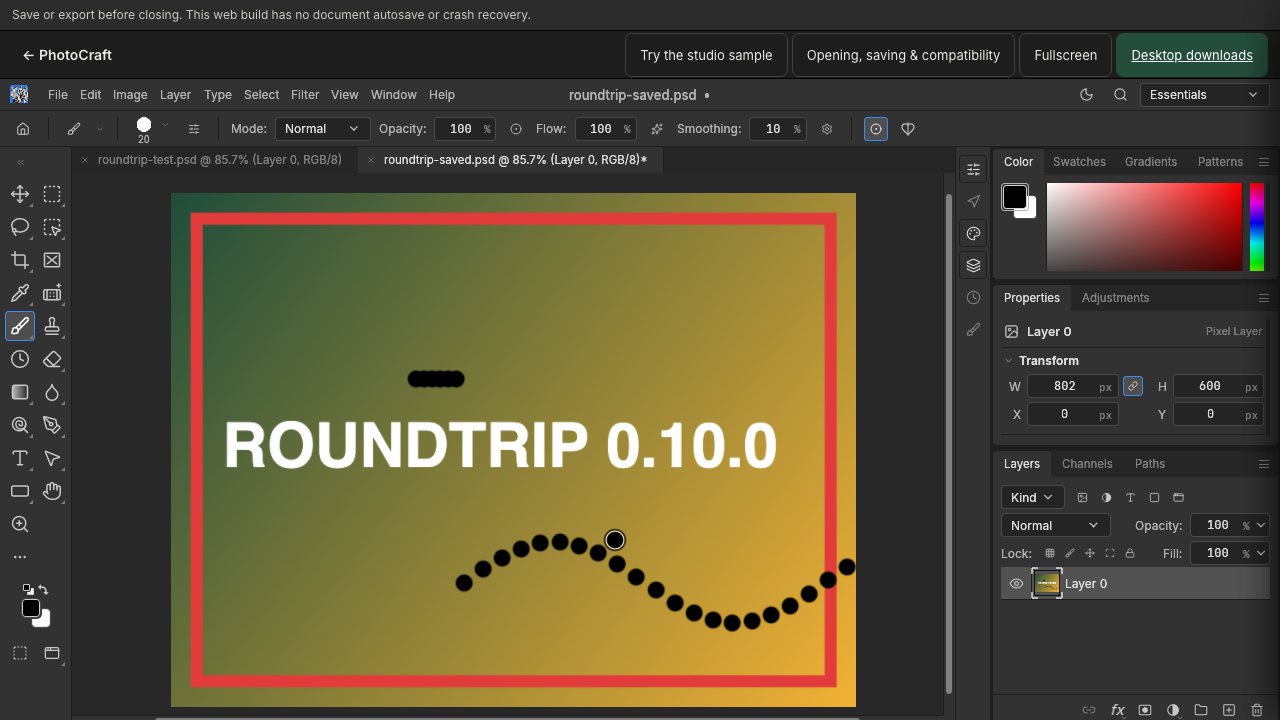
For PhotoCraft 0.10.0. Keep the original file and check layers, fonts and the saved or exported result before relying on a complex PSD.
Saving keeps layers editable; exporting produces a finished image. In PhotoCraft you do both from the File menu, and both land in your browser’s normal download location. This guide refers to the 0.10.0 interface.
What is the difference between an editable file and a flat image?
- Save (PSD) writes a layered document you can reopen to continue editing — text stays text, layers stay separate.
- Export (PNG/JPG) flattens everything into one image for sharing, publishing or uploading.
A practical rule: save a PSD while you might still change something, export a PNG or JPG when the image is done. To convert an existing PSD into an image, open it first — see opening a PSD without Photoshop.
Where are saved files stored?
PhotoCraft has no server storage. Files arrive through your browser’s download flow and appear wherever your browser saves downloads (commonly the Downloads folder). The editor shows no “autosave” — close or reload the tab and unsaved work is gone, so save regularly.
How do I save an editable PSD copy?
- Choose File → Save As.
- Pick a name. Choose a new filename when working from someone else’s file so the original stays untouched.
- The
.psddownloads to your device. Reopen it with File → Open to check that layers and text survived.
How do I export a PSD as PNG or JPG?
- With the document open, choose the export option in the File menu.
- Pick the format:
- PNG — lossless, keeps transparency. Use it for graphics, screenshots and anything with transparent areas.
- JPG — smaller files, no transparency (transparent areas become white or a background color). Use it for photographs.
- Export, then open the downloaded file to check it.
What should I check after exporting?
Open the file outside the editor and confirm:
- Text is spelled and positioned correctly.
- Transparency is preserved (PNG) or acceptably filled (JPG).
- Dimensions match what you expected.
Reopen the saved PSD separately and confirm the layers you care about are still there. If something differs, keep both files and simplify the document to find the cause — see saving transparent PNGs when transparency is the issue.
Limits worth knowing
PhotoCraft is in early alpha and this site pins a specific build. Complex effect stacks may not flatten identically to Photoshop, and some PSD features may not survive a round trip. Verify one representative file before batch-relying on the workflow.